

WhatsApp Business automation
AIGrowBot
WhatsApp Business automation — bot flows, campaigns and an AI assistant on your own number.

The problem
Why This Exists
Enquiries arrive on WhatsApp at every hour, most of them asking the same handful of questions. Answering each one by hand does not scale, and the ones that arrive after closing simply wait — by which time the person has asked somebody else.
The solution
What AIGrowBot Does
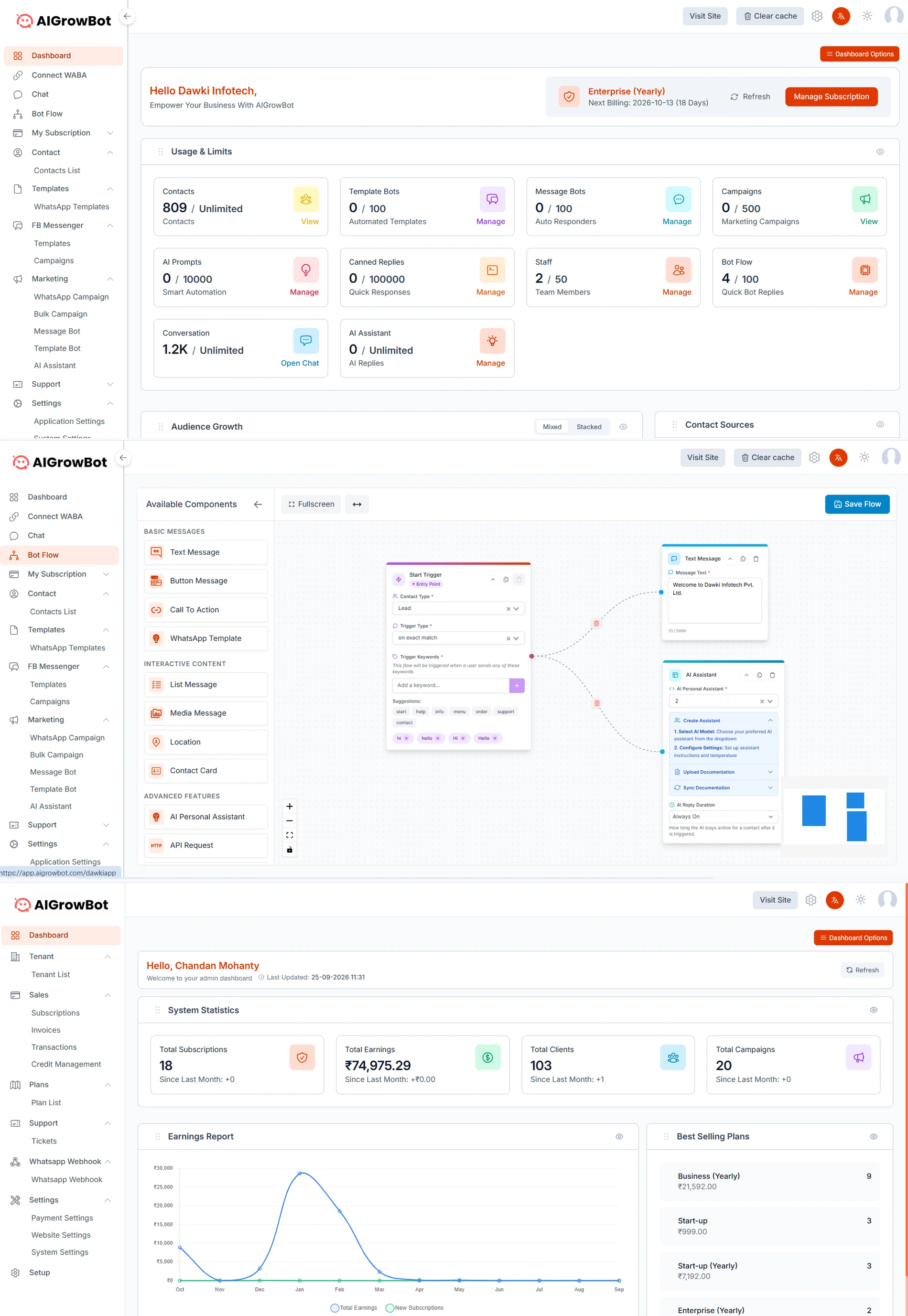
AIGrowBot connects your WhatsApp Business account and puts a visual bot flow behind it: a trigger, the messages and buttons that follow, and an AI assistant that takes over when the question is not one of the scripted ones. Contacts, templates, campaigns and the live chat inbox sit in the same place.
Features
Key Features
Connect your own WhatsApp Business account
Runs on your WABA and your number, not a shared one — so the conversation is with your brand.
Visual bot flow builder
Drag a start trigger, text and button messages, lists, media, location, contact cards, call-to-action and API requests onto a canvas and wire them together.
Triggers on keywords or exact match
Fire a flow on an exact match or on any of a set of keywords, scoped to a contact type such as Lead.
AI assistant with your own documentation
Choose the model, set instructions and temperature, upload or sync your documentation, and set how long the assistant stays active on a contact after it is triggered.
Templates and campaigns
WhatsApp templates, template bots, message bots, bulk campaigns and marketing campaigns, with Facebook Messenger templates and campaigns alongside.
Live chat inbox with canned replies
Staff pick up conversations in a shared inbox, with quick responses for the answers that repeat.
Contacts and audience growth
A contact list with its sources, and audience-growth reporting over time — mixed or stacked.
Team seats and per-plan limits
Staff seats, bot-flow count, template and message bots, campaigns, AI prompts and canned replies, each metered against the plan on the dashboard.
Benefits
What You Get Out of It
The repeat questions answer themselves
A scripted flow handles what is asked most, and the assistant handles the rest from documentation you approved.
After-hours enquiries do not wait
A conversation that starts at midnight gets an answer at midnight, and the thread is there for your team in the morning.
One place for the broadcast and the conversation
The campaign that goes out and the replies that come back are in the same tool, rather than a sending service and an inbox that never meet.
Use cases
Where It Fits
- A clinic answering appointment and timing questions outside opening hours
- An institute handling course and admission FAQs during an intake
- A showroom or project sales team qualifying enquiries before a callback
- Any business already receiving most of its enquiries on WhatsApp
FAQs
AIGrowBot — Common Questions
Does it use my own WhatsApp number?
Yes. You connect your own WhatsApp Business account, so conversations happen on your number under your brand.
Can the AI answer from our own material?
Yes. You upload or sync your documentation to the assistant and set its instructions, so it answers from what you have approved rather than from the open internet.
What happens when the bot cannot help?
The conversation stays in the shared inbox for a person to pick up, with the transcript already there. You also set how long the assistant remains active on a contact after it is triggered.
Does it work with Facebook Messenger too?
Yes — Messenger has its own templates and campaigns alongside the WhatsApp side.