

Sales & performance CRM
Smart CRM
Leads, deals, campaigns and the money behind them — with the calling and the follow-ups in the same place.

The problem
Why This Exists
Client work scatters across phones, spreadsheets and chat apps. Calls go unlogged, follow-ups slip, campaign spend is never matched to the leads it produced, and nobody can see team performance without asking four people for their numbers.
The solution
What Smart CRM Does
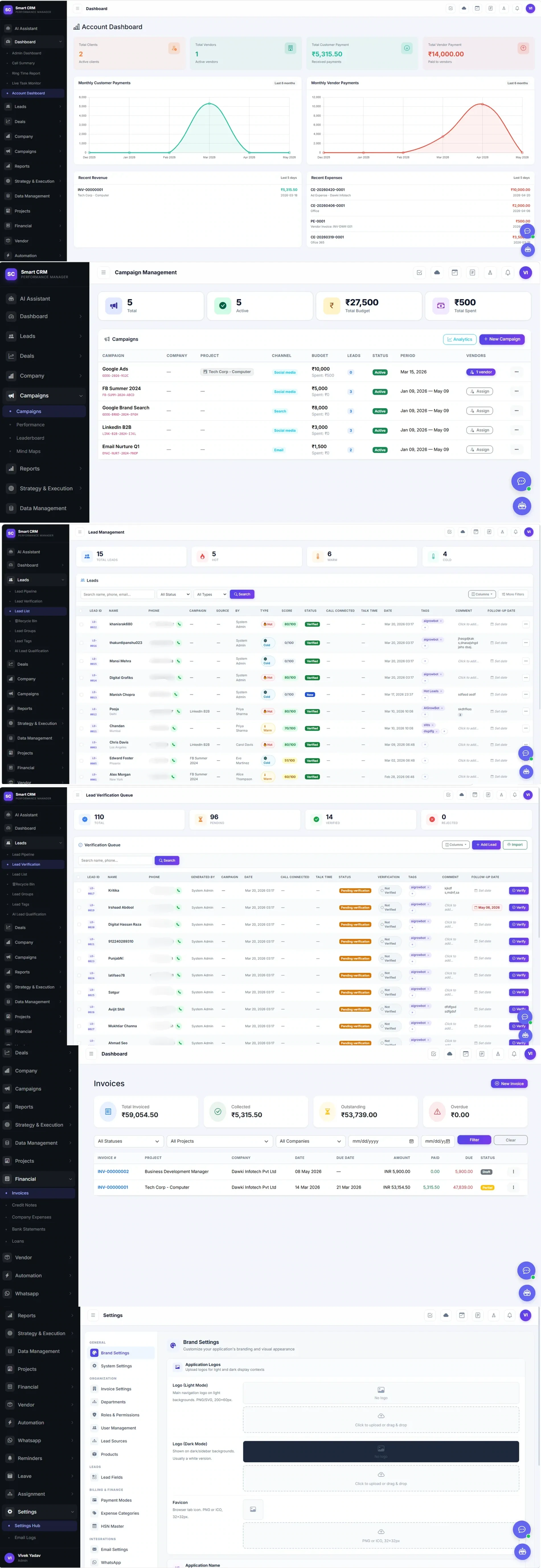
Smart CRM keeps the lead from first touch to invoice: verification queue, scoring, pipeline, deals, the campaign that generated it and the money it eventually brought in. Calls are dialled in-app with talk time recorded, follow-ups carry dates, and the dashboards are built from that same data rather than a separate report.
Features
Key Features
Lead pipeline with a verification queue
New leads land in a queue to be verified before they reach the pipeline, so the list a salesperson works is one somebody has checked.
Scoring and hot/warm/cold typing
Every lead carries a score out of 100 and a temperature, with AI lead qualification available alongside the manual call.
Calling with talk time and connection state
Dial from the lead row; call-connected and talk-time are recorded against the lead with the comment and follow-up date.
Campaigns tied to the leads they produced
Budget, spend, channel and period per campaign, with the lead count attributed back — plus performance, leaderboard and mind maps.
Deals, companies and projects
Leads become deals against a company and project, so the pipeline reflects the work rather than a list of names.
Financial: invoices to bank statements
Invoices with paid and due tracked per line, credit notes, company expenses, bank statements, loans, and vendor payments on the other side.
Account dashboard
Clients, vendors, customer payments received and vendor payments made, with monthly trend for both and the most recent revenue and expenses.
Automation and WhatsApp
Reminders, assignment rules, automation, and WhatsApp built in — with leave and roster for the team running it.
Configurable without a developer
Brand settings, roles and permissions, user management, lead sources and lead fields, payment modes, expense categories and HSN master are all settings.
Benefits
What You Get Out of It
Spend and outcome in the same view
A campaign's budget, its spend and the leads it produced sit on one row, so the question 'did that work' has an answer without a spreadsheet.
Nothing lives only in someone's phone
Calls, talk time, comments and follow-up dates attach to the lead, so a handover or an absence does not lose the thread.
The finance side is not a separate system
Invoices, expenses, vendor payments and bank statements sit against the same companies and projects the sales side is working.
Use cases
Where It Fits
- An agency running paid campaigns that needs cost-per-lead tied to the leads themselves
- A sales team working a verified lead list with scoring and follow-up dates
- A services business that wants pipeline and invoicing against the same company record
- A team that needs role-based access across admins, staff and clients
FAQs
Smart CRM — Common Questions
Does it record calls and talk time?
Calls are dialled from the lead row, and call-connected state and talk time are recorded against that lead alongside the comment and follow-up date.
Can campaign spend be matched to leads?
Yes. Each campaign carries its channel, budget, spend and period, and the leads attributed to it are counted on the same row.
Is invoicing included, or does it need a separate tool?
Included. Invoices, credit notes, company expenses, bank statements, loans and vendor payments are all in the Financial module, against the same companies and projects.