

Digital business cards
myDBC
Digital business cards, email signatures and virtual backgrounds — one brand kit behind all of them.

The problem
Why This Exists
Printed cards go out of date the moment somebody changes role, and most of them end up in a drawer. Meanwhile every person in the team writes their own email signature, so the brand looks slightly different in every inbox it reaches.
The solution
What myDBC Does
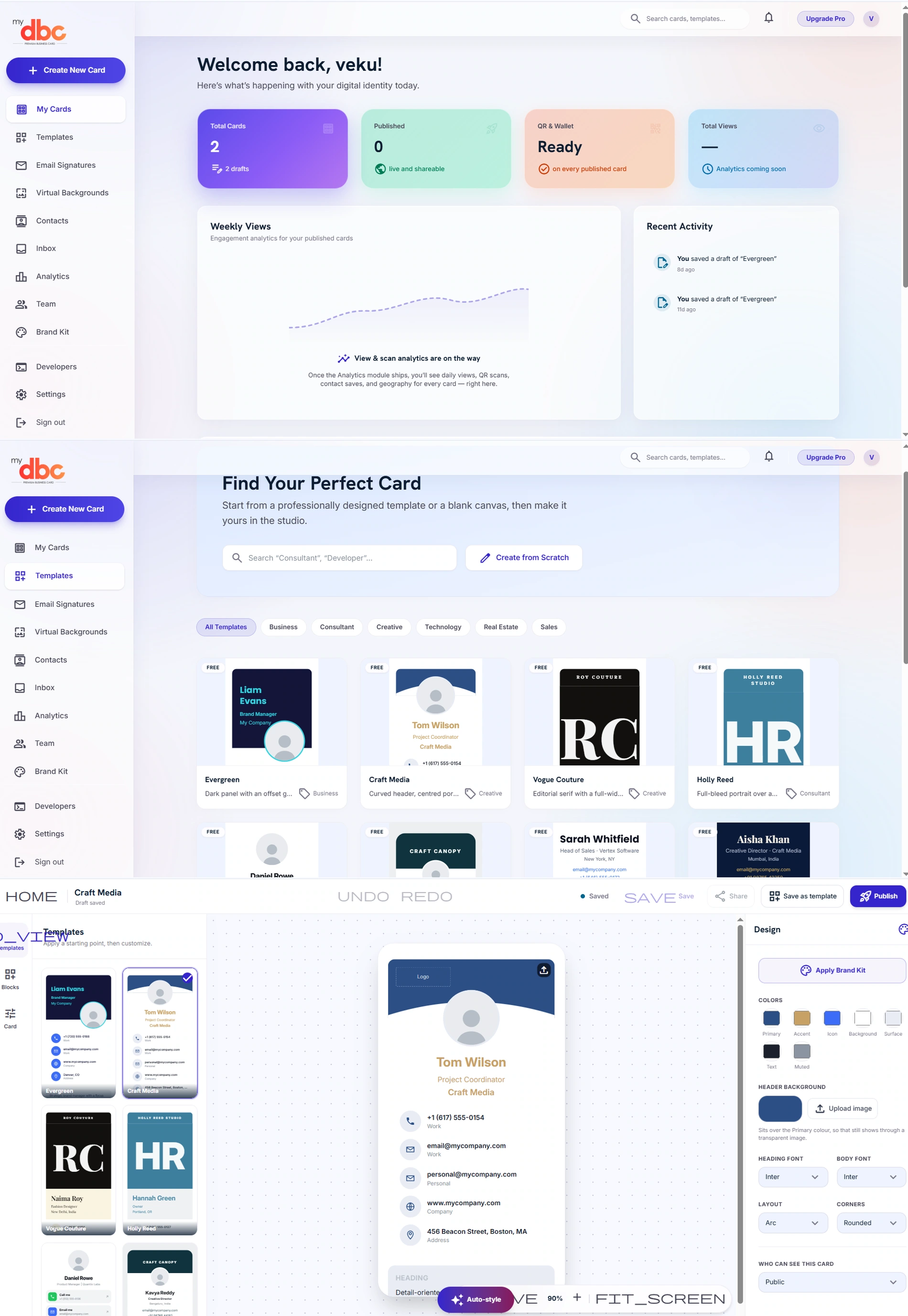
myDBC turns the card into something you publish and update: design it in the studio from a template or a blank canvas, publish it to a link with a QR code and a wallet pass, and keep email signatures and virtual backgrounds on the same brand kit so they all change together.
Features
Key Features
Card studio with templates and blocks
Start from a designed template or a blank canvas, then build with blocks — contact rows, headings and the rest — on a live preview.
Design controls that stay on-brand
Primary, accent, icon, background, surface, text and muted colours, heading and body fonts, layout and corner style — or apply the brand kit in one click.
QR code and wallet pass
Every published card gets a QR to scan and a wallet pass to save, so it works across a table as well as over a link.
Publish, share and control visibility
Drafts save as you work; publish when ready, share the link, and set who can see the card.
Email signatures
Signatures built from the same brand kit, so the team's email looks like one company.
Virtual backgrounds
On-brand call backgrounds for the team, alongside the cards.
Contacts and inbox
The people who saved your card, and the messages that came in from it, kept together.
Team and brand kit
A shared brand kit and team management, so a new joiner's card is on-brand without a designer.
Developer access
A developers section for teams that want to issue or manage cards programmatically.
Benefits
What You Get Out of It
A card that is never out of date
Change the role or the number once and the link, the QR and the wallet pass all show the new version — no reprint.
One brand across cards, signatures and calls
The brand kit drives all three, so the team stops improvising and the company looks like itself everywhere.
Something the other person keeps
A wallet pass and a saved contact survive the meeting in a way a paper card usually does not.
Use cases
Where It Fits
- A sales team that wants every card on-brand without a designer in the loop
- A company standardising email signatures across everyone
- Anyone at events who would rather send a link than carry a box of cards
- A team that wants new joiners issued a card on day one
FAQs
myDBC — Common Questions
Do people need an app to open my card?
No. A published card is a web link, and the QR code opens that link in any phone's camera. The wallet pass is there for people who want to keep it.
Can I update a card after sharing it?
Yes. The link stays the same and shows the current version, which is the main reason to use one instead of printing.
Can we keep the whole team on one brand?
Yes. The brand kit holds the colours and fonts, and it can be applied to a card, an email signature or a virtual background in one action.